
Snapchat Planets Order & Meanings – How Solar System Works
Snapchat Planets is a wonderful feature users can only access in Snapchat Plus allowing them to see their closest friends as planets in a solar system. Your profile appeared as the main planet sun in the friendship solar system while your friends are assigned various planets according to their interaction with you. Every planet reflects a friend position based on its communication or snaps activity. In simple words, the closer a planet appears near the Sun the higher that friends will rank on your best friend list. When someone send streaks, texts or reacts on your posts regularly it will appear as Mercury. While Neptune may represent a friends with you interact less. This way, users can easily check their best friends without navigating the whole list manually.
Introduction To Snapchat Planets
Snapchat Planets is a feature introduced by the app for Snapchat Plus users. It turns your friendships into an solar system in which you become the sun and all your top eight closest friends orbiting around you as planets. Each of the planet shows a ranking of the person you talk with most. Mercury is assigned your top closest friend and this order continues based on the interaction with others.
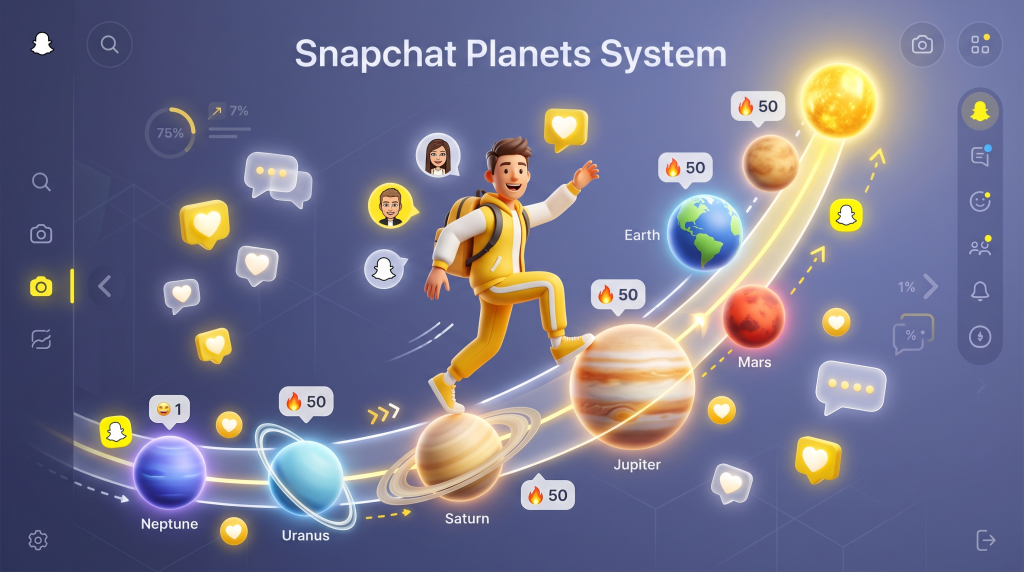
It simplifies for users to see their best friends by replacing number lists with a friend solar system. Despite scrolling the conversations with each friend to see with whom you talks the most Snapchat Planets lets you view this in a fun and easy way. It shows where you and your friends stand in the orbit which means each planet is reflecting the friendship level makes social interactions more engaging.
Snapchat positions every planet by tracking multiple signals which are given below.
- How often you exchange snaps with a friend.
- The conversation frequency and length.
- Responding on each others stories.
- How frequently you make voice and video calls.
- Streaks and reactions on the posts.
The friend rankings keep changing over time due to these signals monitoring by Snapchat regularly. A friend positioned as Jupiter can goes up to Earth next week as per your conversations activity. Users also check the meaning of Snapchat emoji with planets which provides them more insights about the Snapchat solar friend system.
How Snapchat Planets Work?
It functions like the real orbit system where you reflects as the Sun and the close friends of yours are ranked as different planets circling around you depending on the interaction.
The more often you are sending snaps, messages the nearest a friend planet will show to you. On the other hand, if the interaction level is decreased the position will moves accordingly. Snapchat planets updates automatically according to the recent activities of users which results in changing the planet rankings.
Best Features of Snapchat Planets
Planets Assigned Automatically:
The planets positions are assigned automatically to each of your friend after checking the conversation activities. No user need to go through any settings or steps because the app handles the whole procedure by checking the interaction between two people. All you need to do is open the solar planets and it will show the whole solar system with pre-arranged planets ready to explore.
Appealing Visuals:
Every planet inside the solar system has a unique appearance which makes it stand out from others. It gives all planets different colors, stars, heart makes it easy for users to identify the each planet seamlessly. Apart from this the design of ring is also not the same for all the planets making them all fully apart from each others.
Bitmoji for Every Planet:
Each of the planet contains a Bitmoji of a friend on the surface it is linked with. It makes easier for users to view the friendships planets appear in the solar system without any additional hassle. By tapping on the shown Bitmoji you can directly view the specific friend profile without exploring the entire friend list.
Planet Details Through Badge
It is an outstanding feature of Snapchat Planets which allow users to check their planet position in their friends solar system. By just tapping on the friend badge on someone else profile users can quickly see their planet details. It helps to determine the communication with that particular friend in the app.
Rankings Change With Activity
The planets does not remains at a single position for all time and keeps changing their rankings according to the interactions of users. If the engaging level increased between two persons their planet position will move closer in the solar system. Besides, when a friendship becomes less active the planet drops its rank. This reflects the current interaction helps users to see their closest friends in real time.
Snapchat Plus
Snapchat Planets is not available for all the users and remains locked in the standard version. Users are required to purchase Snapchat Plus subscription in order to access this feature. However, it does not comes auto enabled and users need to turn it on from the settings. If you want a more personalize experience while using the app then it is really worth using it.
How Snapchat Friend Solar System Works?
It is essential for users to get Snapchat Plus first to find their planet position in the friends solar system. Once you get the subscription go to the friend profile and discover the best friend badge or friends badge which has a gold color circle. The best friends option shows that you are in their top 8 closest friends. The friends option reflects the friendship connection but with a lower position.
Follow these easy steps.
- Open the profile of your friend in the Snapchat.
- Look for the badges and tap on one option.
- It will show the planet you reflects.
Please note that this feature does not work by default for a lot of Snapchat+ users. Read the section contains steps to enable the friend solar system and view all the planets.
Introduction to Friend Solar System Privacy
The friend solar system provides more fun and takes the users experience to whole new level with its features. In this digital era everybody gives top priority to their privacy therefore Snapchat follows strict security measures for this feature. Snapchat planets is completely secure and does not let any other user to view your friend solar system.
However, this feature stays inactive for first time users and need to be turned on by going into the settings. After enabling users get full control over it providing them flexibility to check planets and even disable it again anytime. Users can not make changes in the planet rankings manually because the whole process is handled by the Snapchat automatically.The planets positions moves as per the users conversations, snaps and in app engagement. The best thing is that Snapchat never reveal the details or planets rankings publicly.
Snapchat Planets Order
Snapchat planets follows the real solar system sequence to show your close eight friends with you talk the most. Your profile is representing the sun and person with you share most of the snaps, send messages will appear as Mercury. This continues for all the friends in the solar system which are explained in details below.

Mercury ( 1st Rank )
Mercury is the first planet in Snapchat friend solar system which reflects your closest friend position. You share the most snaps and chat with this particular person on a daily basis. This planet showsyour friend bitmoji surrounded by bright red heart emojis. When Snapchat assign a friend asthis planet it means you both maintain a very strong bond on in social life.
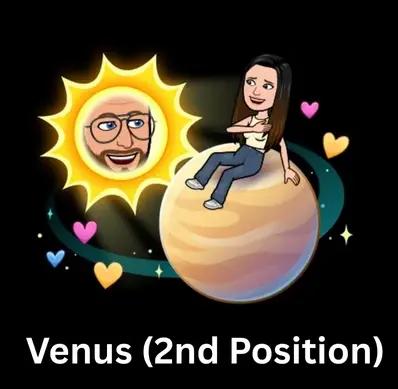
Venus ( 2nd Rank )
It shows your second closest friend you talk through sending text messages, snaps and calls on Snapchat. Your friend Bitmoji placed among pink, yellow and blue color hearts emojis to make the planet appearance eye catching. It shows the interaction with that person is quite often but still the friendship is highly strong.
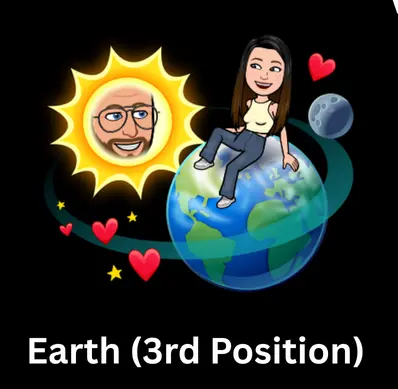
Earth ( 3rd Rank )
This planet stands at the third position inside the Snapchat friend solar system. When you do not interact with a friend daily and only send snaps or texts in a week it positioned as Earth. The Bitmoji of this friend becomes visible with moon and star emojis which makes the planet look visually attractive.
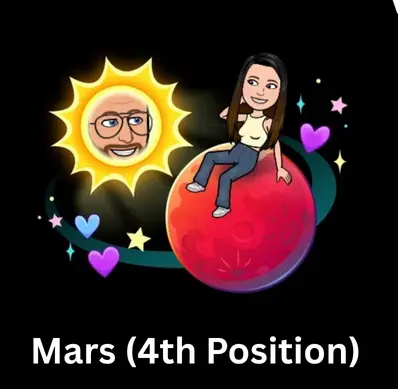
Mars ( 4th Rank )
It stands at the fourth position and belong to a friend you talk to quite regularly on Snapchat. A red planet with star and moon emojis around it makes it look wonderful in the friend solar system. Your interaction with this person may not be at the top but the friendship still holds a good value. This planets represent the person whose presence in your chat list remains active and noticeable every week.
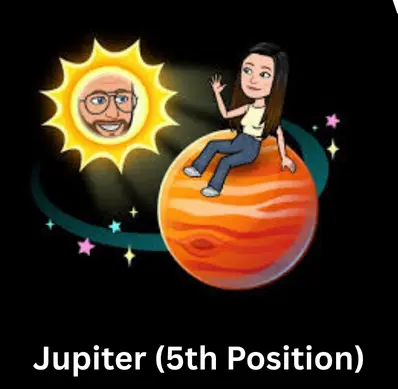
Jupiter ( 5th Rank )
This planet positions at the fifth number and reflects a friend you enjoy talking to on the app but not regularly like other friends. It contains orange color with a gold color circle around it wrapped with colorful stars. When you talk with a person once in a week it appears as Jupiter which means the friendship is still important.
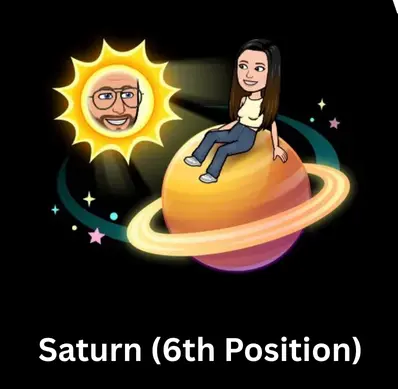
Saturn ( 6th Rank )
With this planet you get to know about the friend which is positioned at number six in the system. When the streak does not remain active with someone on the Snapchat and interaction happens occasionally but the friendship is still valuable. It gets this spot which has golden tone ring around it with some stars emojis.
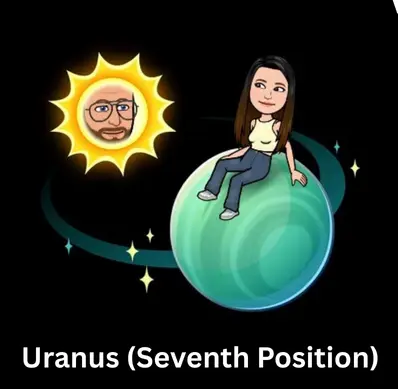
Uranus ( 7th Rank )
This planet gains seventh position showing the friend you talk to barely and snaps or texts are limited. It contains a green color tone with only a single Bitmoji and no stars or other emojis reflects a lower interaction. Being assigned Uranus does not mean that friendship is not important but it tells the communication is not the same like other top friends.
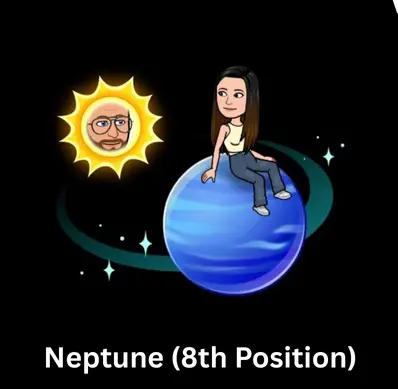
Neptune ( 8th Rank )
It is the last planet that tells a different story about your friendship on Snapchat. It appears in a deep blue tone along with friend Bitmoji. If you only interact on some certain occasions like birthdays or other special events with a person it gains this spot in the friend solar system. However, you still remains friends on the app but it has been months since you last talk show the person as Neptune.
Why Snapchat Planets Have Different Colors?
Lets dive deep into the given details to find out about this.
Mercury
This planet has red color along with dark red hearts appearing around its ring reflecting your number 1st friend on Snapchat.
Venus
It includes yellow color and has multi color hearts circling around the ring. This planet marks your second top close friend on the app.
Earth
A planet having red color hearts and grey color moon above its ring represents the friend positioned at number three in the solar system.
Mars
This light red color planet with small stars which are floating on its ring shows the closest friend standing at fourth position.
Jupiter
The orange color planet containing different color stars around its ring shows the fifth number of close friend in the system.
Saturn
An yellow color planet having huge rings reflecting the friend stands at sixth number. It does not include any hearts just stars and Bitmoji.
Uranus
A green color Snapchat planet that display the profile of your seventh close friend. This means the interaction is very limited with that person.
Neptune
It is the final planet in the Snapchat Planets representing the last closest friend showing connection is still there but no snaps or texts in months.
Difference Between Friend and Best Friends Badge
A gold color badge may appear upon visiting a friend profile next to their user name.It shows the friendship level in Snapchat according to the recent interactions.
If the badge appears with Best Friend tag this shows the person is currently in your top eight close friends on Snapchat.
The friends badge reflects that you positioned in your friends top eight list but they do not appear in your solar system.
This difference about the ranking is common on Snapchat. Actually, it shows that two people are interacting with each other in a different way.
Best Friends and Snapchat Planets Difference
Explore the below given table to understand the difference between Snapchat Planets and best friends list.
| Feature | Extended Best Friends List | Snapchat Planets List |
|---|---|---|
| Availability | Available on standard Snapchat | Exclusive to Snapchat+ subscribers |
| Format | Simple text-based list | Visual planets around the Sun (you) |
| Friend Limit | Shows up to 8 friends | Shows 8 friends as planets |
| Design | Plain ranking system | Colorful, interactive solar system view |
| Purpose | Quick way to see frequent contacts | Adds creativity, fun, and deeper insight into closeness |
Best Friends and Friends Difference on Snapchat
Not all connections with people are the same on Snapchat. A friends badge only shows casual communications without any strong bond. Moreover, the best friends badge tells about the constant interaction activities such as regular snaps, chats and on going streaks. This turns into Friend Solar System for Snapchat Plus users where best friends appears as planets circling around the sun.
| Feature | Friends | Best Friends |
| Badge Meaning | Casual connection | Stronger, more frequent interaction |
| Visibility | Appears for all connections | Limited to top interactions |
| Solar System Role | Not Included | Shown as planets around the sun |
| Ranking | No ranking system | Ordered by snap frequency & chats |
The Meaning Behind Snapchat Planets
Snapchat Planets makes it easier for users to view their best friends in a unique way. Lots of users love see how much they chat with a friend but checking the whole list can take a lot of time. To make it simple the app introduced Snapchat Planets feature. It assign planet to each of your friend with your are talking most of the times from Mercury to Neptune. These rankings are assigned according to the interactions becomes visible in the friend solar system. This feature is developed to keep users engaged with the app. When people see the ranking they want to improve it and for this they send more texts, snaps and comment on friends posts. This way Snapchat increase the usage of the app among users worldwide.
Things That Impacts Planet Positions
Sometimes the friendship stays active but the planet rankings keeps moving constantly. This happens because of the in-app activities. For example, you are sending snaps to one of your friend after 10 days or make a call in a 15 days. Snapchat analyze this interaction and due to this your planet position fluctuates in solar system. For more details dive deep to the below mentioned information.
Frequency of Snaps
The number of snaps you share or receive with a friend on Snapchat helps push your planet closer to the sun. If your planet ranking drops then try sending more snaps.
Interaction
Having daily conversations with friends also affects the rankings in the friend solar system. The longer you chat with a friend the more your planet ranking will increase.
Streaks
It also affects the planets ranking because it shows constant daily interaction with friends. Therefore, try to maintain streak to improve the planet position.
Stories Reaction
The app also count this as strong interaction so react and reply to your friends stories to make your planet stand at the top.
Calls Activity
It does not required to just chat with friends for interaction. Users can also make video or audio calls to show the active communication to app algorithm which helps increase your planet position.
Responding Speed
When you reply to others messages or snaps without any delay it signals the app algorithm about consistent communication. This results in improvement in the position of your planet.
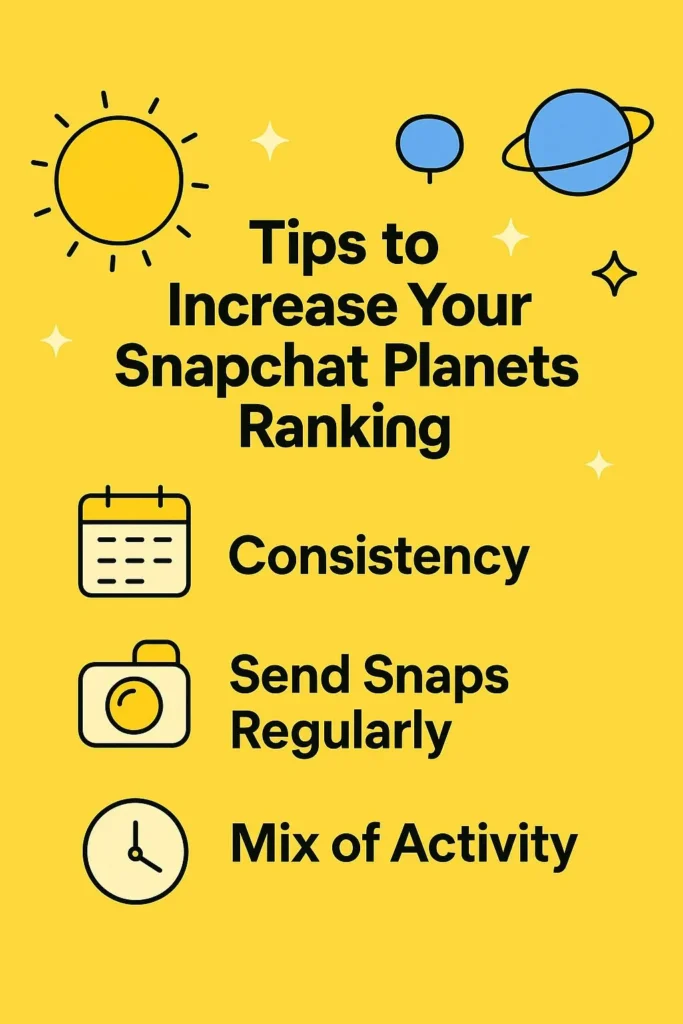
Helpful Tips To Enhance Snapchat Planets Position
Do you want to make your planet visible closer in the friend solar system then follow these below given helpful tips.
- Share snaps constantly.
- Do not leave messages unanswered.
- Make calls and chat frequently.
- Keep sharing stories.
- Use Bitmoji to make snaps engaging.
- Stay consistent while using the app.
Steps To Check Position In A Friend Solar System
It is not much tough to check your position in someones friend solar system on Snapchat. Follow these easy and helpful steps.
Launch Snapchat app in your smartphone and go towards the chat tab or stories section.
- Type the friend name in the search bar having a planet shared.
- After that, tap on the planet and check your position through swiping.
- If there is a Best Friend Badge appears on the profile it means you have a position in the solar system.
Sometimes the users thinks that streaks, snap score and Snapchat planets are the same things. But, each of them works differently and shows users activity on the app. We have explain how they work below for users convenience.
Snapchat Planets
It shows the close interaction with your top eight friends as per the daily interaction.
Snap Score
This number shows the usage of Snapchat for sending or receiving the snaps.
Streaks
This reflects the number of snaps you and a person share without any pause.
Snapchat Friend Solar System Pros and Cons
Pros
Cons
Introduction To Snapchat+
Snapchat+ which also called Snapchat Plus is a premium subscription offered by the app provides users many additional features. These includes Snapchat Planets and more personalization unavailable in the free app version. Users can easily change the app icons, use premium lenses and filters for snaps and get benefits from many other exciting features such as ghost trails and etc.
Main Features of Snapchat+
Snapchat Plus includes many amazing features users will never get in the free version. Some of the primary features are given below.
Custom Themes and Icons
It includes a vast themes collection in which users can choose their required option to decorate the conversations background. Moreover, replacing a theme with a custom solid color and wallpaper is also easy. Besides, users can also set different icons for the app to make it look unique.
Pin Best Friend
Searching for a particular friend in the huge list can really frustrating and consume a lot of time. Therefore, Snapchat Plus make users able to pin one of their best friend at the top.
Story Rewatch Count
In the Snapchat+, users can easily check the total story rewatches anonymously allowing them to get insights about their content. Whenever someone watch your story again it will show that count with complete details without letting others know.
Multiple Tools
Unlike the simple version, Snapchat+ gives users multiple tools to improve their streaks experience. After sending a streak the app will send you automatic reminds ensuring the chain does not break. In addition to this, with the help of this feature you can also make your planet ranking better.
Ghost Trails
Users gets freedom to check their friends recent location on the Snap map which is restricted in the free app version. Please note that, while using this feature certain privacy settings takes place. If you do not want to let others see your trail you can hide it anytime.
Different Sounds & Bitmoji Styles
The regular app version users only get access to some specific Bitmoji but in the plus version it offers unique Bitmoji outfits that you can use freely. Along with this, different new poses also included to take users experience to the next level. Many impressive notification sounds also available that provides more control over the app.
Comparison of Snapchat and Snapchat Plus Features
Below the complete difference between Snapchat free and plus version is explained clearly.
| Feature | Snapchat (Free Version) | Snapchat+ (Paid Version) |
| Cost | Free for all users. | Paid subscription (monthly or yearly). |
| Best Friends List | Standard text-based ranking. | Solar System planets with positions. |
| Customization | Limited. | App icons, chat wallpapers, profile badges. |
| Exclusive Tools | Basic Snap Map, Streaks, Stories. | Ghost Trails, priority replies, experimental features. |
| Friendship Insight | Simple interaction list. | Detailed view with Planets order, badges, and extra data. |
Are Snapchat Plus Planets Ranking Are Perfect?
A question comes to many people mind about the Snapchat friend solar system legitimacy. Many users are curious about the planets ranking and wants to know whether the results are accurate or the system just rank random friends.
Instead of choosing any persons from the friend list Snapchat Planets rely on the users real time interaction in the application to show the friends position. This system measures various factors that includes your communication engagement with others, numbers of snaps you share or gets from a friend. Apart from this, streaks data and reactions also helps the system to view the users in app activity. After analyzing this Snapchat Plus ranks a friend in the solar system. So the answer is yes, Snapchat Planets shows accurate rankings based on users interaction data.
Why Solar System Snapchat Stops Working?
Sometimes the friend solar system does not appear on a user profile and friend page which makes users confused. It usually happens because the user is not having active Snapchat Plus. The planets system are part of paid version therefore only users having an active subscription can view them. Furthermore, if the feature is not turned on from the settings then you may also face issues while accessing it even after having the plus version.
We also see this in various cases that users does not update the app version which leads to stop the feature from working. So, update the Snapchat to its latest version to prevent any problems.
- Ensure your friends has active Snapchat Plus.
- Check the option is not disabled.
- Avoid using outdated app version.
In case the problem does not resolved then reinstall the application. Get in touch with the official support when nothing helps.
Reasons Behind Snapchat Planets Not Showing
Snapchat Planets can stops showing due to various reasons such as expired plan, not enabling the feature from settings and many others. When the subscription ends the planets system stops showing instantly which is one of the most common reasons most users are unaware about. Try to renew as soon as possible to make friend solar system visible again.
Other reasons includes using old version which also plays a role in planets disappearing. Moreover, if the friend profile you are viewing lacks the Snapchat Plus version then in this scenario planets will also not appear. In simple words, having active plan is essential for both users to view this friend solar system feature of Snapchat.
Checklist In case of Snapchat Planets Stops Working
Check Subscription
You need to view the status of your Subscription Plus. If it is expired renew it to bring back the Snapchat Planets.
Explore Settings
Open the app settings and check whether the friend solar system is enabled or not.
Confirm App Version
Please ensure that you are using latest app version.
You also need to confirm about your friend profile Snapchat Plus subscription. If it does not have an active plan then Snapchat Planets can stop showing.
Snapchat Planets Problems and Their Fixes
Plenty of users face issues with the Snapchat Planets which cause inconvenience because the planets stops appearing or not working at all which are common. Majority of these issues gets resolved quickly without taking much time. Below are some of the most common challenges users face and their fixes.
Planets Stops Reflecting on Profile
This problem occurs due to the expiry of Snapchat Plus which fixes by resubscribing.
Incorrect Order of Planets
Snapchat Planets requires time to calculate the friends positions and sometimes it does not update them right after the changes in your interactions. Waiting for sometime usually resolve this problem.
Planet Icon Not Changing
Sometimes the planet icon stops animating and freeze completely which you can fix by clearing the app cache from mobile settings.
Subscriptions Is Not Working
When this problem arise simply log out from your account and wait for a while before login back. Apart from this, check your billing details to ensure the payment is processed with no errors.
Is There A 9th Planet in Snapchat Solar System?
There is a rumor on social media about Snapchat hidden ninth planet available to only users when they reach at a certain high level of interaction with their friends. Several videos are circulating on different social platforms such as TikTok, and X. But, Snapchat officially announced that there is no reality about it and the friend solar system only includes eight planets.
Since the app faces glitches in recent times which results in unexpected changes in the badges or planets. Users thinks that another hidden planet exists and this rumor continue to spread without any validation. After the announcement of Snapchat it becomes clear that it is just an entertaining rumor nothing else.
Information About Snapchat Plus Subscription
Snapchat Plus is an exclusive version which users can only get after paying for this. It comes with lots of awesome features such as personalized icons, premium lens and snap map guest trail. However, getting this subscription is not mandatory for using the app and is truly optional. If you want to get better control over the app customization and access some exclusive features like Snapchat Planets then it is really an ideal choice. The prices for this plus version are different for each region which is $3.99 to £4.99 per month.
Steps To Purchase Snapchat Plus Subscription
The process to get Snapchat Plus is not really a difficult task. However many first time users struggle with the process therefore we bring the easy steps for their convenience here.
- Launch Snapchat app on your smartphone and go into your profile.
- Explore the Snapchat Plus banner or an start icon with gold color.
- Tap it and it will show different plans from 1 month to 6 months and yearly.
- Choose your required plan and confirm the payment.
- Once activated enjoy using the premium features.
FAQ's
Conclusion
Snapchat Planets gives friendships visually appealing letting users to view their top 8 close friends in the form of planets like the real solar system. It ranked all the planets in the exact order from Mercury, to Neptune and shows them in different colors with Bitmoji. Each of the planet shows the interaction with your friends in a simple way. With Snapchat+ also provides users some outstanding features along with the friend solar system like options to customize chats with themes, hiding their trail and much more. Use our above given free to use calculator and check your Snapchat Planet position seamlessly.